How to Compare Stems Against a Reference Mix
A structured A/B and null-testing workflow. Learn how to build a trustworthy stem sum, why loudness matching is essential, and how to read the residual of a null test.
Null test
Reference − stem sum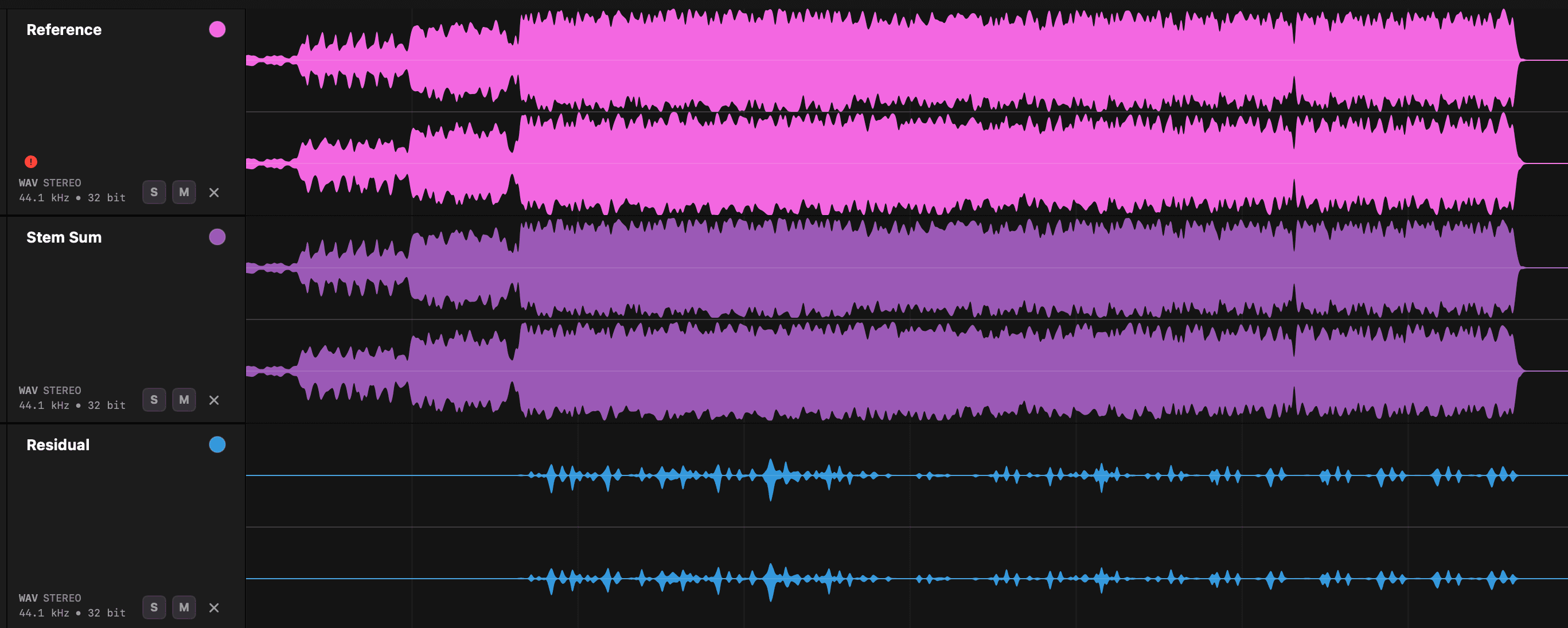
The reference and the stem sum leave only a small residual — what remains is likely master-bus limiting or other mix-bus processing.
Define what the comparison should prove
A reference comparison can answer several different questions: Are all musical parts present? Do the stems begin at the same point? Does their balance resemble the approved mix? Do they reproduce the mix exactly enough to null? These are not the same test, and the expected result depends on how the stems were created.
Important expectation
Build a trustworthy stem sum
- 1Create the session at the correct sample rate. Avoid unnecessary conversion before the test.
- 2Place every stem at the same origin. Don’t drag individual tracks until the music appears to line up.
- 3Recreate the intended routing. Respect pan positions, mono/stereo treatment, polarity, automation, and any documented bus structure.
- 4Set neutral playback conditions. Disable processing that wasn’t part of the original stem print and keep the master path clean.
- 5Route all stems to a comparison bus. This gives you one signal to switch against the reference.
- 6Import the approved reference separately. Ensure it starts at exactly the same sample and isn’t routed through the stem bus.
Level-match before judging
The louder signal will usually appear fuller, clearer, and more exciting even when it isn’t more accurate. Match perceived loudness before making tonal or balance judgments. LUFS can provide a starting point, but short-term programme differences and peak limiting mean the final adjustment should also be checked by ear.
| Comparison | Recommended level treatment | What it reveals |
|---|---|---|
| Arrangement check | Approximate loudness match | Missing parts, wrong edits, obvious balance errors |
| Tonal A/B | Close loudness match over the same section | EQ, width, dynamics and ambience differences |
| Null test | Exact gain and polarity relationship | Sample-level differences under controlled conditions |
| Peak check | Do not normalize independently | Unexpected clipping or limiting differences |
Use section-based A/B listening
Loop short, revealing sections rather than switching across an entire song. Good test points include:
- The first full downbeat
- A dense chorus
- A vocal-only moment
- A transition with effect tails
- The final decay
Switch often enough to retain auditory memory, but not so quickly that you hear only the switching action.
When a null test is appropriate
A null test inverts the polarity of one signal and sums it with the other. Identical signals cancel. For the result to be meaningful, the reference and stem sum must share the same start sample, sample rate, channel layout, gain, pan law, and processing history. Even a slight sample shift or a tiny gain difference can leave a large residual.
Interpreting the residual
| Residual sound | Likely interpretation |
|---|---|
| Almost complete silence | The stem sum is extremely close to the reference. |
| Full mix, quieter | Gain mismatch or incomplete polarity inversion. |
| Transient clicks or attacks | Small timing offset, different limiter response or edit boundary. |
| Bass-heavy residual | Low-frequency phase, gain or master-bus dynamics difference. |
| Mostly sides or ambience | Stereo width, reverb, modulation or pan difference. |
| One clear instrument | Missing, duplicated or differently processed stem. |
| Residual grows through song | Sample-rate, clock or time-stretch mismatch. |
A note on residual
A practical decision hierarchy
First verify that the arrangement is complete. Then compare timing and balance. Next compare tone and dynamics at matched loudness. Only attempt a null when the routing history suggests exact cancellation is realistic.
Engineer checklist
QC your stems in seconds — no DAW needed
Stem Checker loads and plays your stems in sample-accurate sync and flags length issues in your exports — mismatches, missing audio, duplicates, clipping, dual mono and more. A faster, more reliable way to review and organise your stems and multitracks.
Save time. Deliver with confidence.