Why One Stem Is Shorter Than the Others
How to distinguish a harmless ending from a broken export. A shorter file is a clue, not automatically an error — the task is to tell intentional silence from missing content.
Length check
One stem cut early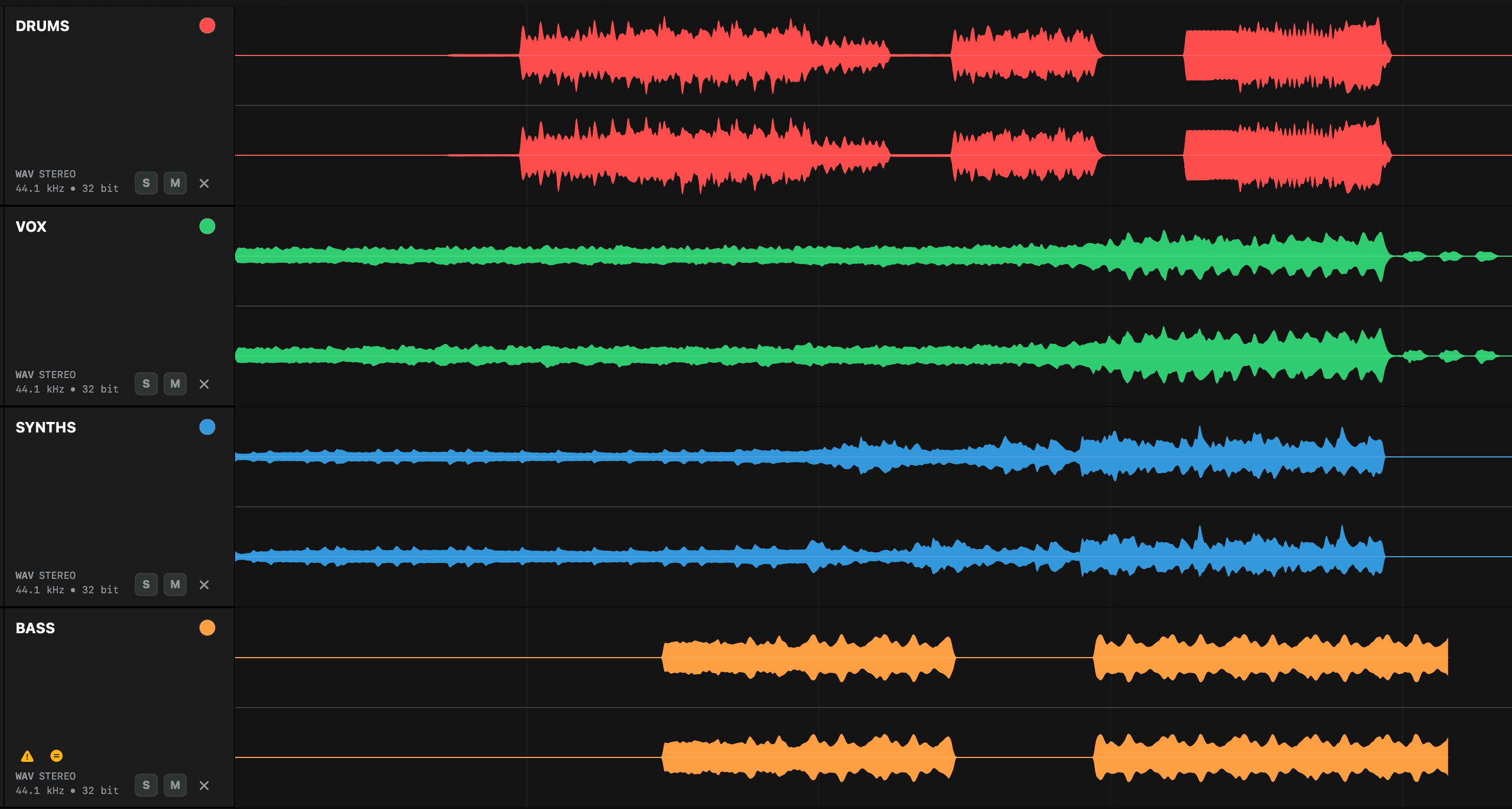
Every stem starts together, but BASS cuts early — a truncated waveform, flagged with a warning in Stem Checker.
A shorter file is a clue, not automatically an error
A bass guitar may naturally stop before the final reverb decay, while an effects stem continues to the end. Length differences become a problem when files were expected to share common export boundaries, or when the shorter stem loses audio that should be present. Your job is to establish whether the difference represents intentional silence, an alternate bounce range, or missing content.
Common causes
| Cause | Typical symptom | What to verify |
|---|---|---|
| Export range ended early | Abrupt stop or missing tail | Bounce end marker and tail settings |
| Exported selected clip only | File starts or ends at audible region | Consolidation and common boundaries |
| No tail included | Reverb or delay cuts off | Effect return routing and tail duration |
| Muted or disabled region | Unexpected silence near the end | Playlist, automation and clip state |
| Different sample-rate handling | Duration differs after import | Metadata and session rate |
| Intentional arrangement | Source simply stops earlier | Reference mix and production notes |
| Render or transfer failure | File is incomplete or corrupted | File size, re-export and archive integrity |
The quickest diagnostic
- 1Compare the waveform against the majority. Note the exact difference in seconds or samples.
- 2Listen to the final audible event. A natural decay suggests intentional content; a hard cut suggests truncation.
- 3Check the same point in the reference mix. Is the instrument, ambience or effect still audible after the stem ends?
- 4Inspect related stems. A dry vocal may end earlier while its reverb stem continues correctly.
- 5Verify the declared export range. Ask whether all files were bounced from the same start and end markers.
- 6Check metadata and file integrity. A rate mismatch or interrupted transfer can produce misleading duration differences.
Useful measurement
When the difference is harmless
A shorter stem is usually acceptable when it contains all intended audio, was still exported from the common start point, and ends in clean digital silence after its final event. Some workflows trim trailing silence to reduce file size, although common-length files are often easier for handoff because their duration itself confirms alignment.
When to request a replacement
- The end sounds abrupt or cuts through a note, fade or effect tail.
- The reference mix contains material after the stem has ended.
- The file begins at a different point as well as ending early.
- The duration changes when imported at the project sample rate.
- The exporter cannot explain why this file used a different boundary.
- The missing content affects reconstruction of the approved mix.
Avoid the tempting repair
Don’t extend a short file with arbitrary silence and assume the problem is solved. Padding can make durations match while leaving missing audio untouched. It’s safe only when the file has been confirmed complete and the mismatch is purely trailing silence.
Engineer checklist
QC your stems in seconds — no DAW needed
Stem Checker loads and plays your stems in sample-accurate sync and flags length issues in your exports — mismatches, missing audio, duplicates, clipping, dual mono and more. A faster, more reliable way to review and organise your stems and multitracks.
Save time. Deliver with confidence.